Page History
...
| Info Box | ||
|---|---|---|
| ||
Downloads:
Relevant Documentation:
|
1.8.
...
2-beta Release Notes
i2b2 1.8.2-beta Release introduces functionality of userof user-created data table definitions definition and data download of limited data sets (LDS) using the defined data definition. . The Data Request Management tool enables project managers to manage the data file exports. In addition, there are minor improvements in the Query tool, improvements to the fast "totalnum" patient counting scripts, and some bug fixes.
Highlight of Features
Top New Features
| Description | |||||
|---|---|---|---|---|---|
| Modern UI Enhancements with Admin Console |
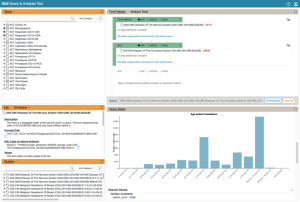
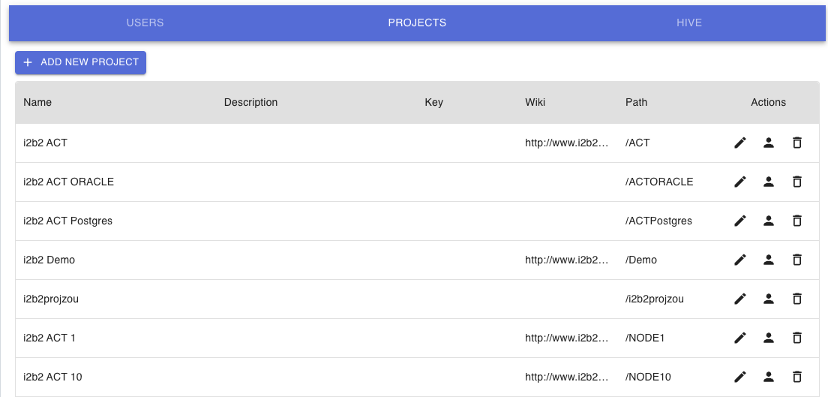
| The new webclient has been enhanced with new features such as faster term search, streamlined icons, and an administration console. | |||
| Data Exporter extension for i2b2 |
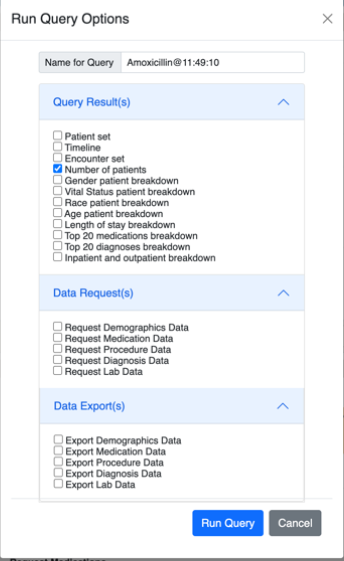
| Using the Run Query breakdown dialog, patient data can be exported as flat files to be loaded into SAS, R and other data analytic tools for further analysis. | |||
ACT Ontology Version 4.1 |
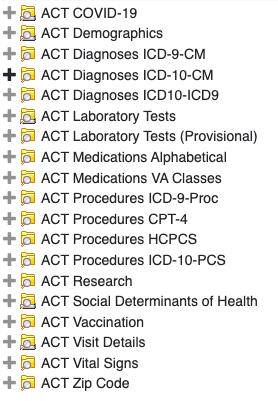
| Version 4.1 provides 19 ontologies supporting i2b2 and OMOP CDM architectures on ORACLE, SQLServer and Postgres databases. | |||
| Create data table for Export Extension for i2b2 |
| The Create Data Table tool allows the i2b2 user to create their own data table definitions with ontology variables and then request data exports in the Run Query dialog. | |||
| Data Request Manager Extension for i2b2 |
| The Data Request Manager tool allows an i2b2 manager to manage and process the user data requests. NOTE: In this beta release, clicking Create File on a custom-table data request in a Postgres database does not actually generate the file. | |||
| Enhanced Data Exporter (v1.8.1) |
| v1.8.1-style data exports (pre-defined tables defined by domain) can now be run and managed using the new tools. Manager users can manage and generate these data file exports using the Data Request Manager Console | |||
UI Query tool improvements | The new webclient has minor updates to improve the user experience |
| The core i2b2 platform now supports the OMOP data model on Postgres database (adding to existing Oracle and SQLServer OMOP support), which is queryable through the comprehensive ENACT-OMOP Ontology. |||
| Digital Twin Bundle (distributed separately) |
| Tools for computing loyalty cohorts and computational phenotypes in i2b2. | |||
Bug fixes |
|


.svg.med.png)
Community-Contributed Features
...
Contribution
...
Contributor
...
Description
...
...
Michele Morris (University of Pittsburgh)
...
The ACT V4.1 Ontology supporting i2b2 and OMOP CDMs enables queries to be run in i2b2 query tool against ORACLE, SQLServer and Postgres databases.
Detailed Documentation on New Features
Data Exporter extension for i2b2
i2b2 can now export patient data for a patient set. The workflow involves breakdowns in the webclient, which allow users to request exports and data managers to generate exports. The export types and options are fully configurable in the database. data exporter functionality is now enhanced the enable i2b2 users to create their own Data table definitions from ontology elements. The data table definitions are displayed as options that can be selected in the Run Query dialog. Users can submit multiple data requests for with a query. The Manager user can manage the data requests and generate data files using a Data Request Manager console. Detailed documentation on set up can be found here: Data Exporter Set-up
The below steps describe the overall process:
- User logs into i2b2 webclient and creates Data table definition using the Create Data Table tool, using desired Ontology elements
- User runs a regular i2b2 query, checking the desired User-created Data request breakdown option option(s) when running the query.
- E-mail is sent to the data manager and the User, informing them that the user's data request has been made.
- The manager logs in and reruns the user query with the Data Export breakdown selection to generate the export flat filesviews the data requests using the Data Request Manager Console.
- Manager user generates the data export files using the Data Request Manager Console.
- The generated export flat data file is stored in a configurable location on the i2b2 server.
- An e-mail is sent to the manager confirming the file extract and how to access the files (which can be shared with the requester).
Steps to upgrade:
First, install the new war file. Next, upgrade the database. Because the upgrade requires loading some new content from the NewInstall, we have created an ant target to upgrade the data tables: upgrade_tables_release_1-8-0 This should be run from Upgrade/CrcData, e.g., ant f data_build.xml upgrade_tables_1 8-0
Detailed upgrade instructions can be found here: Upgrade to version 1.8.1
...
- .
...
The V4.1 Ontology includes 19 ontologies- 3 new and 11 updated and 5 unchanged
Metadata and CRC zip files are provided to load the latest ENACT Version-4.1 ontology into your db schema using ANT scripts.
The CPT4 ontology table is not included with i2b2 due to AMA restrictions on redistribution of CPT code information. Contact the ENACT team to get a copy if your institution is an AMA member.
ACT V4.1 data load process
- Download and extract the newinstall zip package from "Download Binary Distribution" in the top section of https://www.i2b2.org/software
- Edit the edu.harvard.i2b2.data\Release_1-8\NewInstall\Metadata\db.properties file to update the project properties to 'ACT' ; db.project=ACT
- From the edu.harvard.i2b2.data\Release_1-8\NewInstall\Metadata folder, run the ant command: ant -f data_build.xml db_metadata_load_data. This will execute the SQL scripts from the edu.harvard.i2b2.data\Release_1-8NewInstall\Metadata\act\scripts\<db type> folder to create and load the metadata tables
- From the edu.harvard.i2b2.data\Release_1-8\NewInstall\crcdata folder, run the ant command: ant -f data_build.xml db_demodata_load_data. This will execute the SQL scripts from the edu.harvard.i2b2.data\Release_1-8NewInstall\crcdata\act\scripts\<db type> folder to create and load the concept_dimension
- Run the scripts from the edu.harvard.i2b2.data\Release_1-8\NewInstall\Metadata \<dbtype>\scripts folder to load the Schemes, Table_access tables
- You can now verify the new Ontology by logging into the webclient
Additional details on the ontology are available at this link.
ACT i2b2 on OMOP for Postgres database
ACT i2b2 on OMOP functionality uses ACT Ontology in the front-end and enables the i2b2 Software to run against Postgres database that uses the OMOP CDM architecture.
For enabling use of an OMOP database with i2b2, follow the instructions in the install guide for a new install of i2b2 using the i2b2-OMOP install option. The documentation here will guide you through this process. i2b2-on-OMOP With ENACT-OMOP Ontology v4.1
For historical reference on old 2018 OMOP installation , refer to OMOP Home on i2b2 Community Wiki
Changelog
Database Drivers
The JDBC drivers were updated to the following versions.
Server Type | oracle | Postgresql | mssql |
|---|---|---|---|
Driver Version | ojdbc8.jar | postgresql-42.7.1.jar | mssql-jdbc-12.4.2.jre8.jar |
Supported Db Server versions
Server Type | SQL Server | Oracle | PostgresSQL |
|---|---|---|---|
Supported Version/s | 2012+ (tested with up to 2022) | 23.3 | 9 to 14 |
Supported software versions
Application Type | Java | Wildfly | Apache HTD | Apache Ant | Apache Axis2 | PHP | |
|---|---|---|---|---|---|---|---|
Supported Version/s | 8 or 11 | 17 | 3417.0.1Final | 2.0 (RHEL 6) and 2.2 ( RHEL 7) | 1.9.61.7.1 | 2 | 7.2.27 or higher |
Supported Operating Systems
Rocky linux 8 and 9, CentOS versions CentOS versions 7
Windows 2016 -2019
- There is a new New PHP install process for IIS in the i2b2 install guide: 2.5.3.2 PHP for Windows
Unofficially, MacOS and other flavors of Linux are likely to work.
i2b2 Server and Client Changes
New Features and Improvements
| Web client |
|---|
WEBCLIENT-360 New web client User Interface fixes/improvements for 368 1.8.12 Webclient update |
| Core-server |
CORE-428 Data export Extension for i2b2 using java classes and breakdowns CORE-448 I2b2 on OMOP- Postgres - java changes 456 Data Export: agg table CORE-455 Data Export: Request Management admin tool CORE-451 Enhanced Data Export - download file generation CORE-459 updrade to wildfly 34 with axis2 version2 CORE-460 Upgrade to JAVA 17 CORE-454 Upgrade Spring jar to version 6 CORE-447 Update JDBC drivers CORE-458 Software maintainence - drivers, libraries CORE-445 java code folder structure for 1.7 should be changed to refer to 1.8.2 CORE-450 html injection in Queryname and workplace |
i2b2 Database Changes
New Features and Improvements
DATA-17 ACT v4.1 ontology - ANT scripts (github)51 RPDO custom table export stored procedures DATA-2451 I2b2 on OMOP- Postgres DATA-38 Loyalty cohort and computational phenotypes stored procedures for MSSQL and ORACLE Data exporter (v1.8.2) - Add RPDO_Table_Request and Qt_breakdown_path change- add column DATA-32 Faster Totalnum (patient counting) script! |
Bug Fixes
| Core-server / Data | |
|---|---|
| 440 Queries from queue are not processing and returning back 450 html injection in Queryname and workplace CORE-249 Search by code fails ungracefully |
Notes for Developers
For Java 11 install, if If you change the xsd (REST API message definitions), then you will need to regenerate gensrc via JAXB in Java 8. In the i2b2-core cell directory for which you're regenerating the XSD-Java, run the ant target "jaxb_gen" on Java 8 and then build as usual using Java 1117.
Note about the beta release
In this beta release, clicking Create File on a custom-table data request in a Postgres database does not actually generate the file.
...
